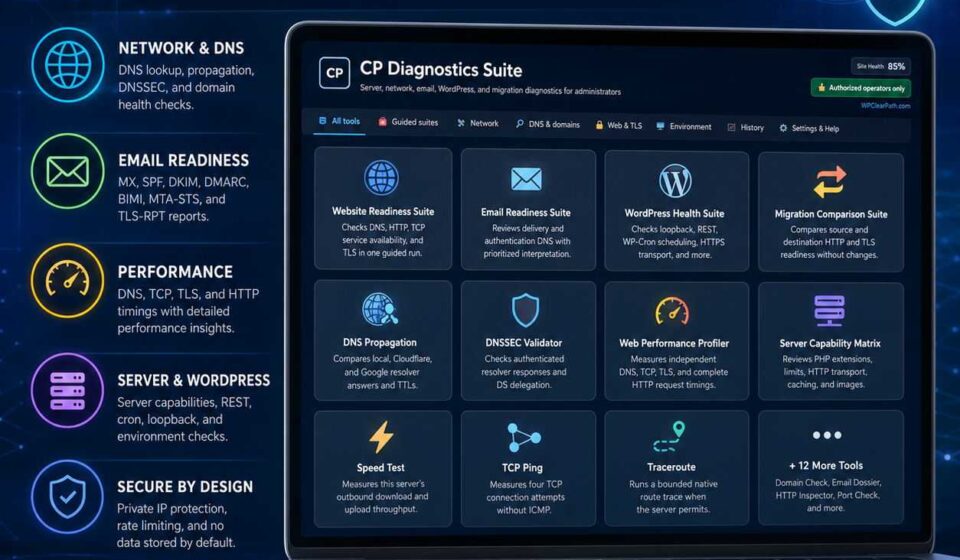

CP Diagnostics Suite
CP Diagnostics Suite is a powerful, administrator-only WordPress diagnostics toolkit for testing your website, server, DNS, email configuration, SSL/TLS, performance, WordPress health, migration readiness, and outbound connectivity—all from one polished dashboard. Run focused checks, review clear results, compare environments, and export support-ready reports without adding anything to your public-facing website.

⚡ All-In-One WordPress Troubleshooting
🛠️ CP Diagnostics Suite
Turn WordPress into an enterprise-grade diagnostics hub. Troubleshoot server performance, DNS propagation, email deliverability, SSL/TLS certificates, WP-Cron, and REST APIs directly from where your site lives — with zero frontend bloat.
🚀 Zero Frontend Overhead
🛡️ Built-in SSRF Protection
📊 Privacy-Redacted Exports
🎯 Stop Guessing What’s Broken on Your Server
Client emails going to spam? Migration failing silently? Rest API timing out? Waiting days for hosting support to check an outbound port? CP Diagnostics Suite puts the diagnostic power of an experienced sysadmin right inside your WordPress admin bar. Test real server conditions, generate shareable support reports in one click, and resolve issues in minutes, not days.
🧭 4 Guided Readiness & Health Suites
One click runs an entire battery of tests, returning clear Pass, Warning, and Critical indicators with actionable remedies:
🌐 Website Readiness Suite
Inspects full domain health end-to-end: authoritative DNS, TCP handshake, TLS certificate validity, and HTTP response statuses to ensure your website is fully primed for traffic.
📧 Email Readiness Suite
Eliminate spam folder issues. Automatically checks MX records, SPF syntax, DMARC policies, DKIM readiness, BIMI branding, and TLS-RPT delivery configurations.
🩺 WordPress Health Suite
Diagnoses loopback requests, REST API endpoints, WP-Cron task backlog, HTTPS transport integrity, and outbound WordPress.org repository connectivity.
🔄 Migration Comparison Suite
Compare source and destination servers side-by-side before changing DNS records. Verify TLS certificates, PHP limits, and HTTP response codes to prevent surprise downtime.
🧰 Full Diagnostic Arsenal (20+ Individual Utilities)
Built for Security-Conscious Administrators
Diagnostics tools must never introduce new vulnerabilities. CP Diagnostics Suite is engineered from the ground up to uphold the strictest security standards:
- Custom Capability Protection: Restricted strictly to users with the dedicated
run_cp_network_toolscapability and verified WP nonces. - Automatic SSRF Protection: Rejects loopback, link-local, private, and reserved IPs by default (with an explicit admin toggle for corporate intranets).
- Zero Frontend Footprint: Leaves 0 scripts, 0 styles, 0 shortcodes, and 0 unauthenticated endpoints on the public frontend.
- Rate Limiting & Concurrency Locks: Built-in burst throttling protects your hosting CPU from accidental or malicious load spikes.
- Client-Side Redaction: Generates clean, Markdown & JSON reports with sensitive tokens automatically masked for safe sharing with hosting support.
⚙️ Technical Specifications
| WordPress Compatibility | WordPress 6.5 through 7.0+ |
| PHP Requirements | PHP 7.4, 8.0, 8.1, 8.2, 8.3+ |
| Database Footprint | Zero permanent bloat. Optional 25-item privacy-reduced history. |
| Frontend Impact | 0 KB (Assets load exclusively on Tools > CP Diagnostics Suite) |
| License | GPLv2 or later (100% Free & Open Source friendly) |
❓ Frequently Asked Questions
Does CP Diagnostics Suite slow down my website?
Not at all. The plugin executes only on-demand when an authorized administrator initiates a test inside the WordPress admin dashboard. It injects zero scripts, styles, or tracking codes into your public-facing pages.
How does TCP Ping differ from regular ICMP ping?
Standard shared/cloud PHP hosting environments prohibit raw ICMP socket creation for security. TCP Ping tests actual connection setup times against target application ports, providing accurate, practical connectivity measurements without requiring root server access.
Can I delegate access to junior developers or support staff?
Yes! Access is tied to the granular run_cp_network_tools WordPress capability. You can assign this capability to specific roles or users using any role-management plugin (such as User Role Editor or Members).
🚀 Supercharge Your WordPress Diagnostics Today
Instant server insights, bulletproof email deliverability, and hassle-free migrations. Download now and take full control of your WordPress infrastructure.
Related Products

NoBugs Debugger AI
NoBugs Debugger AI helps WordPress developers turn confusing debug logs, PHP warnings, deprecated notices, and error messages into clear, actionable insight. Monitor logs, review system status, inspect WordPress debugging constants, and use AI-powered explanations to understand what went wrong, why it matters, and how to fix it faster.