
CP Quick Frontend Editor
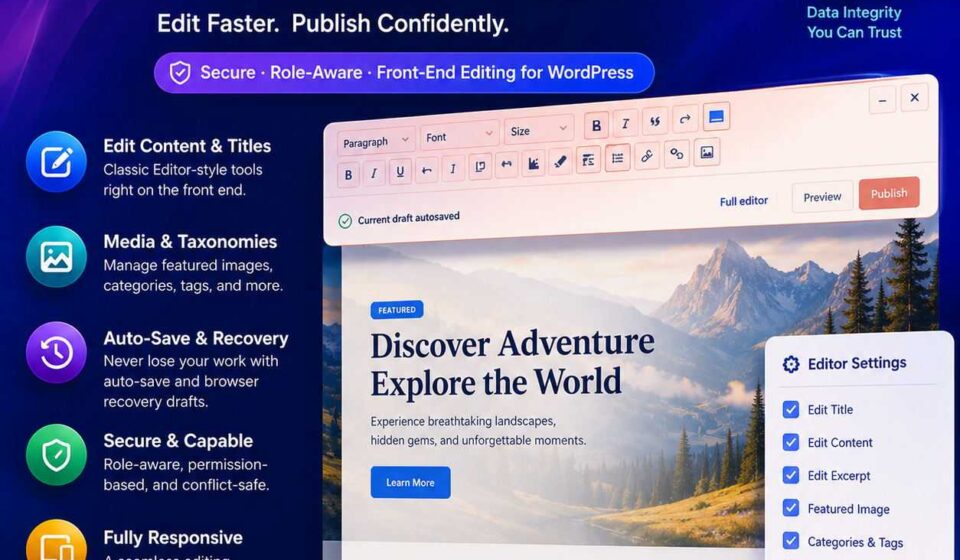
Edit WordPress titles, content, excerpts, featured images, and taxonomies directly on your live website with CP Quick Frontend Editor! Skip slow admin dashboards using an accessible classic formatting toolbar featuring 25 designer themes and native media integration. Automatic revision conflict detection and private draft recovery keep your valuable data safe. Fast, secure publishing made simple!

Edit Content, Images & Taxonomies
Directly On Your Live Website 🚀
Say goodbye to slow admin dashboards and endless page reloads. CP Quick Frontend Editor puts an ultra-responsive, secure, and accessible editing toolbar right where your content lives.
❌ The Old, Clunky Workflow
- Spot a typo on your live page.
- Log into
wp-adminand locate the post. - Wait for heavy block editor scripts to load.
- Make a one-word fix, update, and switch tabs.
- Clear cache and refresh to see if it looks right.
✅ The CP Quick Frontend Way
- View your page live as logged-in editor.
- Click into the title, body, or excerpt right on the page.
- Format text, insert images, or tweak tags in seconds.
- Hit Publish or let Auto-Save handle it.
- Done in under 5 seconds — no admin detour required!
✨ Perfect For Content Creators, Editors & Client Sites
Empower your team and non-technical clients to update blog posts, landing copy, featured images, and SEO categories without touching the backend dashboard or risking broken page layouts.
🔥 Packed With Powerhouse Features
In-Place Content & Title Editing
Directly edit titles, body content, and post excerpts with a live real-time character counter. Instant feedback as you write.
Classic Formatting Toolbar
Complete control with fonts, sizes, colors, alignment, lists, indentations, horizontal rules, and clear-formatting tools via accessible Dashicons.
Native Media Library Integration
Insert images directly at your active text caret, or replace and remove the Featured Image using WordPress’s trusted modal media picker.
Taxonomy & Category Search
Search and assign categories, tags, and public custom taxonomies on the fly. Includes parent breadcrumbs to disambiguate duplicate term names.
Smart Internal Link Finder
Link to internal posts without copying URLs manually. Features transient caching, arrow-key navigation, and optional “open in new tab” toggles.
Bulletproof Data Integrity
Protects Gutenberg blocks and dynamic shortcodes from being flattened. If blocks are detected, the editor safeguards them and links to the full dashboard.
Crash-Proof Recovery Drafts
Closed your tab accidentally? Unsaved changes are safely preserved in private browser local storage. Restore with one click whenever you return.
Office & Word Paste Sanitizer
Automatically strips messy Microsoft Office XML tags, inline junk styles, and invalid namespaces when pasting from Word, Google Docs, or Apple Pages.
25 Designer Toolbar Presets
Choose from 25 coordinated color themes to match your brand or theme palette. Includes minimize, hide, and expand window management.
Strict WordPress Permission & Conflict Architecture
Your security and site integrity are never compromised. CP Quick Frontend Editor verifies native object-level capabilities (edit_post) for every action. Selecting an allowed user role never bypasses author restrictions.
⚡ Optimistic Revision Locking
🌐 Multisite Network Aware
🚀 Clean REST API Endpoints
⚙️ Up and Running in 60 Seconds
Install & Activate
Upload the plugin ZIP file via your WordPress admin or FTP. Activate with one click.
Select Roles & Post Types
Choose which user roles have access, pick eligible post types, and select your favorite toolbar style preset.
Edit Live On The Front-End
Visit any post or page as a logged-in user. The quick toolbar appears automatically — ready for instant updates!
💡 Frequently Asked Questions
❓ Does selecting a user role bypass WordPress permissions?
No. Security is prioritized at every layer. Users must have both an allowed role in settings and standard WordPress object-level edit capabilities (edit_post) for that specific item.
❓ Why are complex blocks and dynamic shortcodes protected?
Browsers only receive rendered HTML on the front end. Saving that rendered output over block or shortcode source would flatten and destroy dynamic layouts. The editor protects dynamic content and provides a direct 1-click link to the full dashboard editor.
❓ What happens if someone else edits the post while I have it open?
The plugin uses optimistic revision tokens. If the post revision changed elsewhere while your tab was open, the save request is safely rejected and you are prompted to reload without overwriting recent changes.
❓ Where are recovery drafts kept?
Recovery drafts remain private in the author’s local browser storage. They are never sent to third parties or logged unnecessarily, and they automatically clean up upon publishing or discarding.
Instant Download & Complete Peace of Mind
Get immediate access to the production-ready plugin zip, full documentation, free lifetime updates, and dedicated technical support.
Related Products

ClearPath Media Library Manager
Organize, compress, convert, clean up, and back up your entire WordPress media library with intuitive virtual folders, SEO accessibility tools, and zero risk of broken links. As your WordPress site grows, your Media Library turns into an unmanageable dumping ground with unorganized files, massive images slowing down speed, and missing alt text damaging your rankings.

ClearPath Traffic Insights
High-performance, 100% self-hosted WordPress analytics plugin designed to deliver deep visitor intelligence directly inside your admin dashboard—without third-party tracking scripts or cookie consent headaches. Featuring real-time visitor monitoring, cache-friendly dual tracking, cookieless hashing, UTM campaign attribution, and developer-ready REST APIs, it gives you complete data ownership with zero impact on your site’s loading speed.