
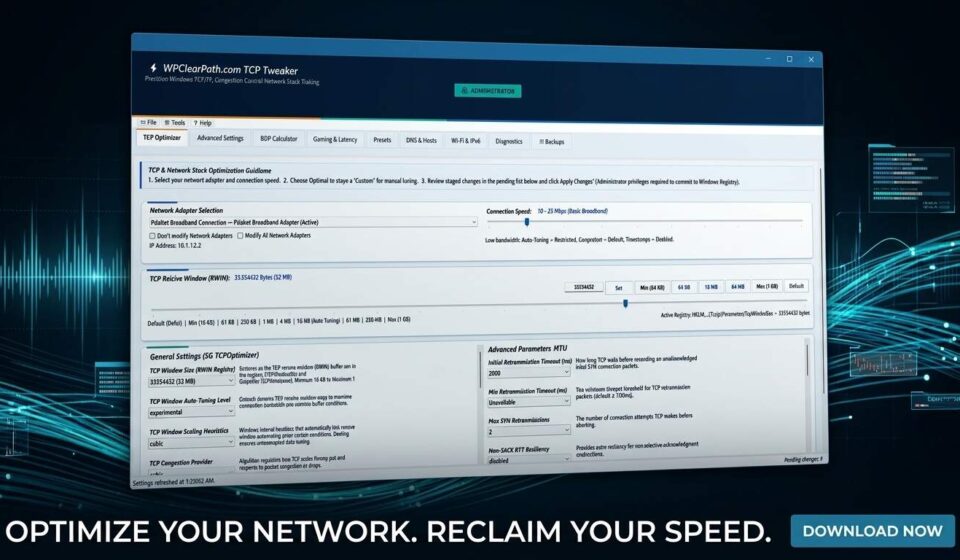
WPCP TCP Tweaker 2.5.2 (Windows)
WPClearPath.com TCP Tweaker
Enterprise-grade network stack tuning, competitive low-latency optimization, and journaled adapter control engineered specifically for Windows 10 & 11.
Why Windows Defaults Hold Your Network Back
Windows network stack settings are pre-configured for broad backward compatibility across millions of mixed consumer, office, and legacy systems. For modern competitive gamers, high-speed broadband subscribers, and power users, these standard defaults create serious bottlenecks:
Delayed ACK algorithms and Nagle buffering bundle small real-time packets together, introducing measurable input delay and hit-registration lag in competitive games.
Conservative TCP window auto-tuning and legacy congestion algorithms artificially cap throughput, failing to fully saturate high-speed fiber pipes.
Typical downloadable “.reg” or “.bat” files blindly overwrite values with zero recovery journals, often causing DNS lockouts or unrecoverable adapter errors.
10 Powerful Network Optimization Modules
A comprehensive desktop control center that unifies TCP stack tuning, hardware driver properties, and deep network diagnostics.
⚙️
1. Core TCP/IP Stack & Auto-Tuning
Adjust TCP Auto-Tuning levels (Normal, Restricted, Disabled), modern congestion providers (CUBIC, CTCP, BBR2, NewReno), Explicit Congestion Notification (ECN), and RFC 1323 timestamp overhead.
- Fine-tune initial and minimum Retransmission Timeouts (RTO)
- Eliminate synthetic auto-tuning scaling heuristics
- Configure dynamic TCP Receive Window (RWIN) registry scaling
⚡
2. Gaming Latency & MMCSS Tuning
Built specifically for esports and competitive multiplayer titles where every millisecond counts.
- Disable Nagle’s algorithm (TCPNoDelay = 1) to transmit packets immediately
- Tune TCP ACK Frequency (TcpAckFrequency = 1) for rapid game responses
- Unthrottle multimedia network processing (NetworkThrottlingIndex = Disabled)
- Optimize CPU background task reservations (SystemResponsiveness = 10)
🚀
3. Workload-Oriented Presets
Evaluate curated profiles with a single click, featuring a transparent pending review window before any change is written.
- Ultra-Low Latency & Gaming: Optimized packet scheduling and zero queuing
- High-Bandwidth Broadband: Maximized throughput for 1G/2.5G/10G & 4K streaming
- Balanced Productivity: Rock-solid web browsing and multi-tasking stability
- Windows Default Baseline: Clean baseline to restore standard OS defaults
🔧
4. Advanced Adapter & Driver Controls
Interface directly with your network hardware using verified driver-advertised capabilities.
- Configure Receive-Side Scaling (RSS), Checksum Offload, and LSO
- Tune Interrupt Moderation, Energy Efficient Ethernet, and Flow Control
- Pinpoint settings by unique adapter GUID so inactive adapters are never touched
🎯
5. Application-Owned QoS Policies
Prioritize crucial gaming or voice applications across all local network interfaces.
- Generate clean, application-owned QoS policies with DSCP prioritization tags
- Enable “Do Not Use NLA” so QoS applies even on non-domain home networks
- Prevent conflicts with pre-existing enterprise Group Policy objects
📶
6. Wi-Fi Diagnostics & Stutter Shield
Stop random ping spikes caused by background wireless scans while gaming on Wi-Fi.
- WLAN Autoconfig Toggle: stops periodic background scans that induce 200ms+ spikes
- Native cached BSSID inspection: reveals SSID, BSSID hardware MAC, and signal %
- IPv6 binding adjustments: toggle protocol preferences safely
🛡️
7. Fast DNS Changer & Safe Hosts Editor
Manage hostname resolution speed and security from a single, unified panel.
- 1-Click DNS switcher: Cloudflare (1.1.1.1), Google (8.8.8.8), Quad9, OpenDNS, or Custom
- Built-in Hosts file editor with dirty-state safety and byte-exact backup preservation
- Configure internal Windows DNS query priority over legacy NetBIOS
🔍
8. Precision MTU Probe & Benchmark
Eliminate packet fragmentation and diagnose route performance with real-time tools.
- Dynamic ICMP Path MTU probing detects the optimal unfragmented packet size
- Multi-Edge latency benchmark tests round-trip times and jitter across global regions
- Deep adapter inventory: inspect MAC addresses, link speeds, gateways, and DHCP state
🧮
9. Bandwidth-Delay Product (BDP) Calculator
Discover the exact theoretical TCP Receive Window (RWIN) required to fully saturate your connection.
- Calculate ideal buffer sizing based on connection speed (Mbps/Gbps) and round-trip ping (ms)
- Prevent link underutilization over long-distance routes and high-latency hops
🔒
10. Journaled Recovery & Rollback Safety
Engineered with a safety-first architecture that eliminates the risk of broken network adapters.
- Automatic pre-write snapshotting: exact original values and data types are saved before any edit
- One-click direct restore with SHA-256 backup verification
- Windows System Restore Point verification required before deep Winsock/TCP stack resets
How WPClearPath.com TCP Tweaker Compares
| Feature | Registry Scripts (.bat/.reg) | Legacy TCP Utilities | WPClearPath.com TCP Tweaker |
|---|---|---|---|
| Windows 10 & 11 .NET 8 Native | ✖ No | ⚠ Outdated / XP-Era | ✔ Yes (Native x64) |
| Automated Pre-Write Rollback Journals | ✖ No (Blind write) | ✖ No | ✔ Yes (Exact-Byte State) |
| Per-Adapter GUID Pinning | ✖ No (Hits all interfaces) | ⚠ Fragile names | ✔ Yes (GUID Anchored) |
| Live ICMP MTU & Latency Benchmark | ✖ None | ⚠ Basic ping only | ✔ Yes (Multi-Edge Suite) |
| Integrated Hosts File & DNS Switcher | ✖ No | ✖ No | ✔ Yes (With byte backups) |
| Executable Size & Portability | N/A (Scripts) | Bundled installers | ✔ ~900 KB (Zero Bloat) |
How to Optimize in 3 Simple Steps
Launch & Inspect
Run normally for read-only inspection, or Run as Administrator to stage system adjustments.
Select & Preview
Choose a pre-configured profile under Presets or customize individual parameters. Review every staged change before applying.
Apply with Journaling
Click Apply Changes. The software snapshots your current state to an isolated recovery journal before applying changes.
Frequently Asked Questions
Can I easily revert all changes back to my original Windows settings?
Yes. Before applying any write operation, WPClearPath.com TCP Tweaker writes an exact snapshot of original registry values, data types, and adapter GUIDs into a versioned recovery journal. You can restore your original state directly from the Backups tab with a single click.
Does this utility require an installer or leave background background services running?
No. WPClearPath.com TCP Tweaker is a 100% portable, standalone single-file Windows x64 executable (~900 KB). It installs no background daemons, scheduled tasks, or telemetry services.
What are the system requirements?
The utility requires Windows 10 or Windows 11 (64-bit) with the Microsoft .NET 8 Desktop Runtime installed. Standard user rights are sufficient for read-only inspection; Administrator elevation is required when applying network modifications.
Is a computer restart required after applying changes?
Most TCP/IP stack adjustments and DNS changes take effect immediately. Hardware network adapter driver properties (such as Interrupt Moderation or Large Send Offload) require a Windows restart for the physical driver to load the newly staged registry values.
Ready to Optimize Your Network Stack?
Get instant access to WPClearPath.com TCP Tweaker. Portable, fast, safe, and backed by verifiable recovery journaling.
Download WPClearPath.com TCP Tweaker
