
WP Performance Control
ClearPath WP Performance Control: Professional-Grade Control for Your WordPress Stack
Let’s be honest: most WordPress sites are a “black box.” You know they’re running, but you don’t always know how hard the server is working or what’s slowing things down. ClearPath (technically WP Performance Control) was built to change that. It’s a precision tool for professionals who need absolute authority over their site environment without the headache of manual file editing or database bloat.
The Impact: Stop Guessing, Start Seeing
The biggest problem with performance tuning is the guesswork. ClearPath provides a “clear path” to a faster, more secure site by exposing hidden system data. Instead of wondering if your caching is working or why the database feels sluggish, you get granular control and real-time visibility from one clean, professional dashboard.
-
Faster Load Times: By stripping away unnecessary WordPress overhead, you reduce the weight of every page load.
-
Cleaner Databases: Preventing bloat before it starts ensures your site stays snappy over the long term.
-
Reliable Maintenance: Seeing exactly when tasks are scheduled to run means no more “missing” background processes.
Essential Features for Total Control
ClearPath focuses on high-impact areas that usually require messy code snippets or multiple plugins.
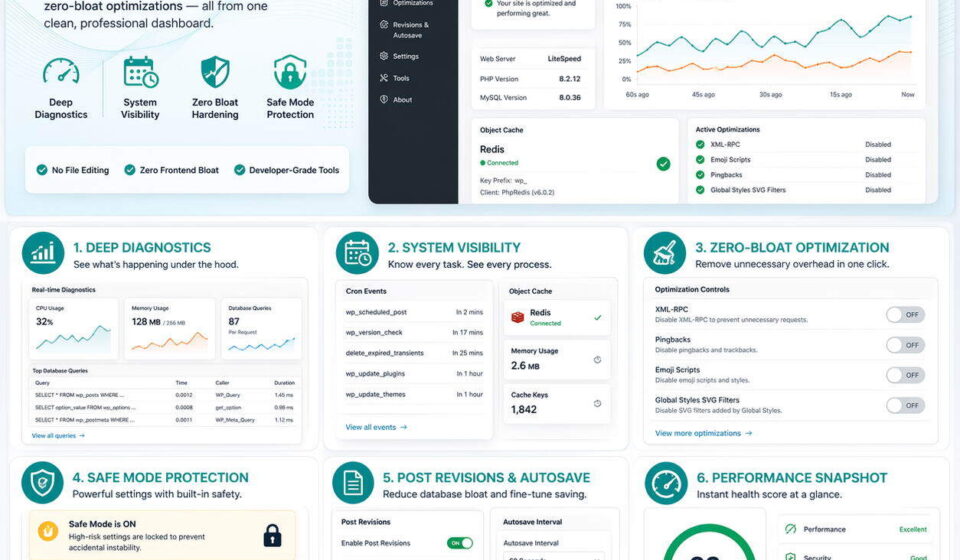
1. Deep Diagnostics & System Visibility
Stop flying blind. You can now monitor real-time database queries, memory pressure, and server-level PHP configurations directly from your admin panel.
-
Cron Viewer: Track upcoming scheduled tasks to ensure your site is running like clockwork.
-
Object Cache Detector: Instantly verify if your Redis or Memcached connections are actually active.
2. Zero-Bloat Hardening
WordPress comes with a lot of “extras” you probably don’t need. ClearPath lets you toggle off the noise with a single click:
-
The “No-Bloat” List: Easily disable XML-RPC, Pingbacks, Emoji scripts, and Global Styles SVG filters.
-
Content Control: Adjust how often WordPress autosaves and limit post revisions to keep your database lean.
3. Safety First (Safe Mode)
We know that performance settings can occasionally be “breaking” changes. That’s why Safe Mode Protection is enabled by default.
-
UI Locking: Advanced or high-risk settings are automatically locked to prevent accidental instability.
-
Health Snapshots: Get a diagnostic score based on your current request and optimization settings so you can see the immediate impact of your changes.
Built for the Way You Work
ClearPath isn’t just about functionality; it’s about the experience. It features a lightweight, Light Mode-optimized interface designed to feel like a native part of your workspace. Under the hood, version 2.0.0+ uses strict dependency injection for core classes, ensuring the plugin itself adheres to the same high coding standards you expect from your own projects.
No file editing, no clutter—just precision engineering for the modern WordPress stack.